WDCC User Guide for Data Publications
Version 1.6, September 2026
Table of Contents
- 1 Introduction
- 2 Initial Contact
- 3 Submission Agreement
- 4 Data Preparation
- 5 Submission of Metadata - MetaXA Guide
- 6 Submission of Data
- 7 Quality Control
- 8 DOI and PID Assignment
- 9 Curation
1 Introduction
The World Data Center for Climate (WDCC) is hosted by the German Climate Computing Center (DKRZ) in Hamburg.
WDCC collects, archives, and disseminates Earth System data and climate-related products relevant for climate and Earth System research with a focus on climate simulation data.
It is a FAIR repository and certified according to the criteria of the CoreTrustSeal.
WDCC is accredited as a regular member of the World Data System.
WDCC offers DataCite DOI publication for archived data collections to make them citable.
DataCite is a leading global DOI provider for research data.
The mission of WDCC is to ensure long-term data accessibility and reusability of climate data.
This document supports the WDCC Step-by-Step Guide and aims to guide users through the process of publishing data in the WDCC.
1.1 Submission Steps
The WDCC team will support you, starting from your initial intent to archive data until the data are published in WDCC.
Before you start the submission process in WDCC, make sure that you have the authorization to publish the data.
In WDCC, the submission process includes the following steps, which are described in detail in the remainder of this document:
- Initial Contact
- Submission Agreement
- Data Preparation
- Submission of Metadata
- Submission of Data
- Quality Control
- DOI and PID Assignment
- Curation
2 Initial Contact
Whenever you wish to publish data in the WDCC, the first step is to contact us.
Write an email to data@wdc-climate.de including a short statement describing the data, your contact details and project details, and the approximate size of the data to be archived.
Also indicate whether you wish to have a DataCite DOI assigned to the data.
Based on your description, we will decide whether your data fit into the scope of the WDCC and guide you through the publication process.
More specifically, provide the following information:
- Institute
- Scientific project
- Do you need a DOI?
- By when do you need the DOI or the data to be archived?
- Where are the data located? (If already on Levante, provide the path)
- Data volume: Approximately how much data is involved?
- Data granularity: Approximately how many files are there?
- What is the file format (e.g., NetCDF)?
- Data organization: How are the data structured (e.g., by models, simulations, variables)?
- License: If you do not intend to use CC licenses (see https://creativecommons.org/), briefly describe the desired license.
- Will there be any changes to the data? Will additional data be added later? Should an open time series, versioning, or specific data organization be considered?
- Anything else that could be important about your data.
If you cannot provide all the information in the first email, you can add these later in the process.
Your first email to the WDCC team at data@wdc-climate.de will open a ticket in a request tracker.
We will contact you shortly with further instructions.
Do not write a new email, but only reply to this thread.
Otherwise, a new ticket would be opened.
3 Submission Agreement
The submission agreement regulates how your data should be archived.
You will discuss with us how your data should be structured and organized into hierarchical elements, as well as licensing issues and authorship.
3.1 License
You need to decide under which license to publish your data.
We suggest CC BY 4.0 (Creative Commons Attribution 4.0 International) for data submissions.
Generally, Creative Commons licenses are used by academics for sharing research data and are offered as a choice by WDCC.
A short overview is given here.
3.1.1 Creative Commons Licenses
- https://creativecommons.org/licenses/by/4.0/
- https://creativecommons.org/licenses/by-nd/4.0/
- https://creativecommons.org/licenses/by-nc/4.0/
- https://creativecommons.org/licenses/by-nc-nd/4.0/
- https://creativecommons.org/licenses/by-nc-sa/4.0/
- https://creativecommons.org/licenses/by-sa/4.0/
Summary (human readable):
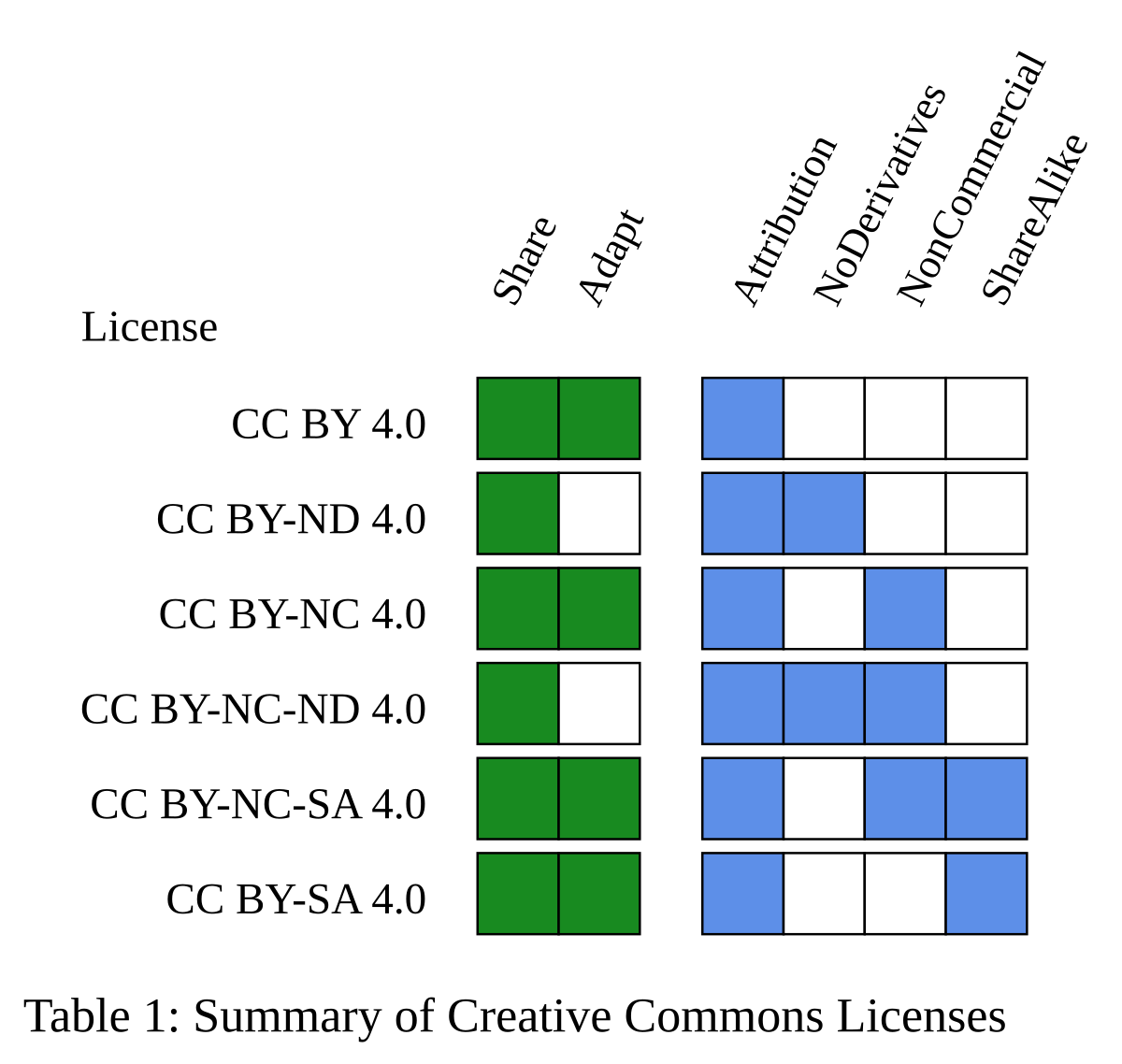
For details on which terms apply to each Creative Commons license, refer to the table Summary of Creative Commons Licenses.
You are free to (green):
- Share - copy and redistribute the material in any medium or format
- Adapt - remix, transform, and build upon the material.
The licensor cannot revoke these freedoms as long as you follow the license terms.
Under the following terms (blue):
- Attribution - You must give appropriate credit, provide a link to the license, and indicate if changes were made. You may do so in any reasonable manner, but not in any way that suggests the licensor endorses you or your use.
- NoDerivatives - If you remix, transform, or build upon the material, you may not distribute the modified material.
- NonCommercial - You may not use the material for commercial purposes.
- ShareAlike - If you remix, transform, or build upon the material, you must distribute your contributions under the same license as the original.
Summary of Creative Commons Licenses
No additional restrictions: You may not apply legal terms or technological measures that legally restrict others from doing anything the license permits.
Notices:
You do not have to comply with the license for elements of the material in the public domain or where your use is permitted by an applicable exception or limitation.
No warranties are given.
The license may not give you all of the permissions necessary for your intended use.
For example, other rights such as publicity, privacy, or moral rights may limit how you use the material.
3.2 Hierarchy Structure Description
We will advise you on how to best structure your data for publication in WDCC.
Data in WDCC are organized in multiple elements with a hierarchical structure.
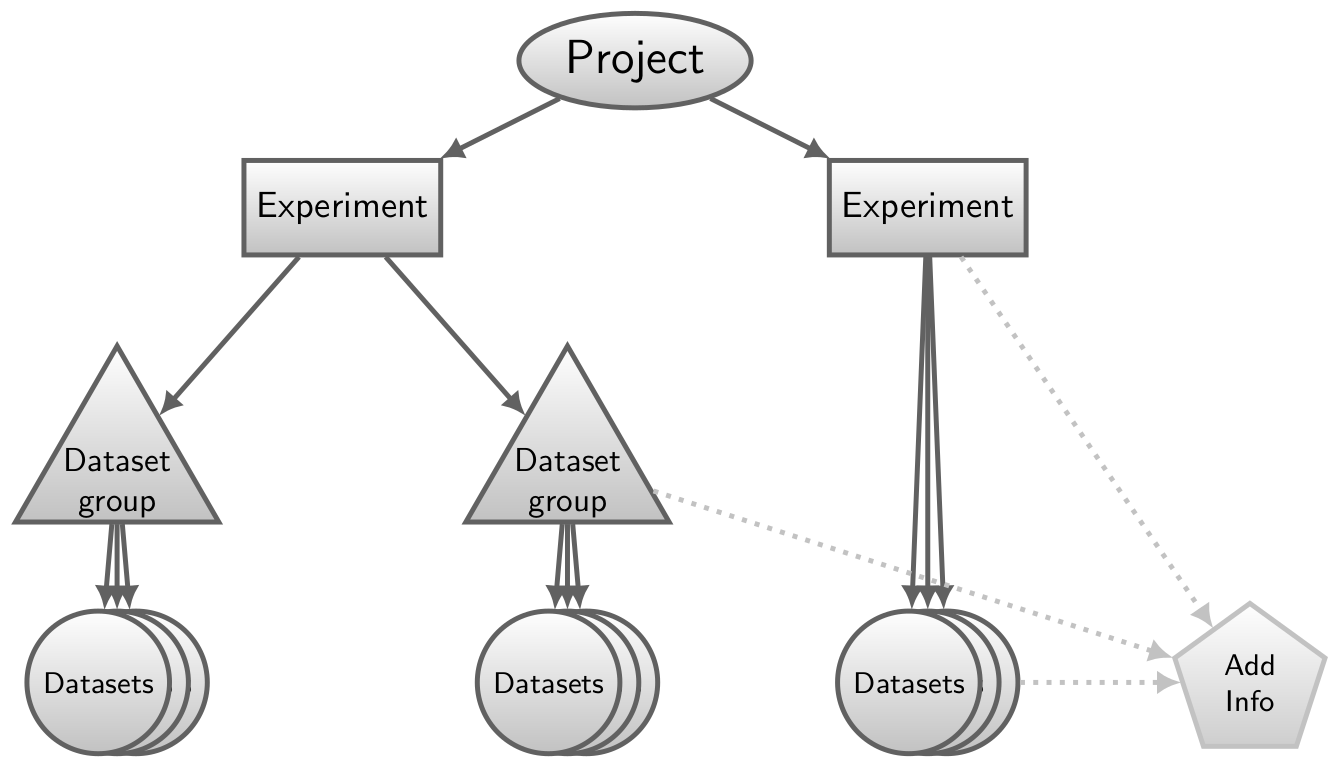
These hierarchical elements are named: Projects, Experiments, Dataset Groups, and Datasets.
The relationships between them can be described with a tree structure as shown in the figure WDCC hierarchical structure elements.
For the top-level elements only single-parent (mono-hierarchical) relationships are supported.
That means that only one parent is allowed for each Experiment and Dataset Group, but a parent can have multiple child elements.
Datasets and Additional Info entries (which are a bit of an exception and will be described later in this guide) need to have at least one parent.
Projects, Experiments, and Dataset Groups contain the overall description of the data, i.e. the metadata.
Metadata is the description of the data itself.
Detailed metadata is essential for later reuse of the data and therefore for long-term archiving.
These elements (Project, Experiment, and Dataset Groups) can therefore be used to structure the data.
The data themselves are located in the Datasets (which also contain a description of the data).
Each Dataset is part of a hierarchical tree with an Experiment and a Project, while Dataset Groups are optional elements that are only used for more complex structures.
A minimalistic structure needs to contain at least one Project, one Experiment, and one Dataset.
The only hierarchical elements that can receive a DataCite DOI are Experiments and Dataset Groups.
It is not possible for Projects or Datasets to receive a DOI.
WDCC hierarchical structure elements
Project:
A Project is the top-level hierarchical element.
It can be an externally or third-party funded project, or any other scientific project, umbrella, or research activity.
It is mainly a scientific research activity and can be the parent element of one or more Experiments.
Use it to organize collections of data from different data sources (e.g. different models or different institutes) that still belong to the same scientific project.
Experiment:
An Experiment is a child of a Project and a compilation of Dataset Groups or Datasets.
An entire Experiment can receive a DataCite DOI.
Note that "Experiment" is just a name for a hierarchical element and should not be confused with a model run, for example.
Dataset Group:
A Dataset Group is a compilation of Datasets or Dataset Groups.
This optional element is not needed for smaller projects, but can be helpful for larger or more complex structures to organize data at a finer granularity.
An entire Dataset Group can receive a DataCite DOI.
A Dataset Group is a child of an Experiment or another Dataset Group.
Dataset:
A Dataset consists of one or more data files and their description (the metadata) needed to make the data understandable.
A Dataset is a child of an Experiment or of a Dataset Group.
Additional Info:
An Additional Info is an optional element that is located at the same hierarchical level as a Dataset, i.e. it is a child of an Experiment or a Dataset Group and can have more than one parent.
It is defined as a compilation of documents (or sometimes plots, scripts, etc.) that further enhance understanding of the data.
An Additional Info can also receive a DataCite DOI.
3.3 Nomenclature
In the hierarchical structure described above, each element needs a name that serves as the title for this entry and will also be used in the WDCC search interface.
In general, the structure and nomenclature are your choice, but we will advise you and ask you to follow the guidelines listed below.
The entry name serves as a unique identifier for the metadata and has a maximum length of 200 characters. Follow these guidelines for naming:
- The first letter of each word should be capitalized.
- Use spaces between words instead of underscores, unless absolutely necessary.
- The name should clearly describe the content of the entry and be easy to understand, providing a clear idea of what the data represents, even to those who may not be experts in the field.
- Dataset names should make sense on their own, without needing additional context such as the Experiment or Dataset Group.
- Avoid using a mix of letters, numbers, and excessive changes in case (upper/lower), as this can make the entry harder to find.
- If a version number is needed, use this format: "Title of the Entry (Version 2.1)".
4 Data Preparation
Prepare your data files for submission.
The following provides guidance on what to take into consideration.
We will ask you for some example files (or the location of your files if they are accessible to us) so we can do some first checks of our own.
Before data archival, we will perform a final check of all your files against the WDCC guidelines and minimal standard.
4.1 Data Format
Only open-source data formats are accepted in WDCC.
The preferred file format for archiving is NetCDF (Network Common Data Format).
More information on NetCDF can be found here.
Other supported data formats are, for example, GRIB (GRIdded Binary), CSV, and ASCII.
Zarr data are also accepted, but only zipped, since the data are stored on tapes.
Note that most of the advantages of Zarr will not be available in WDCC.
If you need to archive your data in another (open-source) format, contact us to discuss whether another file format is appropriate.
Each Dataset can have only one file format.
If you have multiple file formats, you need to divide your data into different Datasets according to the file formats.
4.1.1 Additional Info entries
If you want to upload additional material, convert it to PDF, which is the preferred format for Additional Info files.
In some cases it might be appropriate to upload other formats, depending on the content.
Contact us to discuss whether another file format is appropriate.
4.2 CF Conventions
Your files need to follow the CF Metadata Conventions for NetCDF data.
The CF conventions define metadata standards that provide a definitive description of what the data in each variable represents and the spatial and temporal properties of the data.
An important part of the CF conventions is the set of CF standard names for variables.
Refer to the current CF standard name table for a list of available CF standard names and check whether there are appropriate standard names for your variables.
These should be added to the NetCDF file headers (as
standard_name).
You can also add a long_name attribute to the file headers to describe your variables. Use it in addition to standard_name, or use it on its own if you cannot find an appropriate CF standard name in the list.
If there is genuinely no appropriate CF standard name, remove the standard_name attribute. Do not invent standard names.
If you think a standard name is missing from the table, you may request a new one in the CF vocabularies issue tracker.4.3 WDCC Minimal Standard
Prepare your files to fulfill at least the minimal standard required for publication in WDCC:
- Your data should pass a CF check without any errors (see CF Conventions for details)
- Each variable should have at least the attributes
standard_nameand/orlong_nameas well as the attributeunits(unitless variables should have the unit "1") - The global attributes should contain at least the following:
conventions,title,source,creator(orcontact),institution, andcreation_date.
If you have further questions regarding the minimal standard and how to apply it to your data, contact us.
4.3.1 Global Attributes for the WDCC Minimal Standard
| Field | Required | Comment |
|---|---|---|
| conventions | ✓ | The metadata conventions followed by the file should be CF conventions (version 1.4 or higher). Additional conventions/standards can be added as well. |
| title | ✓ | The title should briefly describe what data the NetCDF file contains. |
| source | ✓ | Source should briefly describe how the data were produced. For model data, list model and version. For observational data, list which observation and instrument. |
| creator | ✓ | The full names of the people who created this data resource. Give ORCID if available (otherwise email). |
| contact | ✓ | The full names of the people who act as contacts for this data resource. Give ORCID if available (otherwise email). |
| institution | ✓ | Name of the institution where this data was produced (institute name, city, country). |
| creation_date | ✓ | Date when this file was last changed. |
4.3.2 Check Your Files
Before you transfer your data to DKRZ, use a CF checker to make sure that your data pass without errors.
For a first check, you can use the WDCC NetCDF Checker. You need to be logged in to use it.
You can either upload a file or paste the output of
ncdump -h into the browser. This can be useful if the file is located on Levante, for example, and not on your local computer.
Be aware that you can only check the file header of a single file with this tool. This will give you a good first estimate of whether your file fulfills the WDCC minimal standard.To check data content as well, especially for a large number of files, you can run the WDCC Checker directly on your device. The checker is available from GitLab and is the same tool that we use on your data for the final file check.
4.4 File Size and Compression
The size of each individual file should not be larger than 8 GB.
If your files are larger than 8 GB, split them into smaller files (if in doubt, discuss with us how to proceed with your files).
A single Dataset should not contain more than 1000 individual files.
Apply compression to your files, but do not create tarballs or zip archives.
If you have many small files, it is usually better to create larger NetCDF files.
4.5 Labeling of Files and Directories
Sort your files so that you have one directory for each Dataset.
Files should be labeled in a consistent manner.
Special characters and spaces in file names should be avoided.
The file names must be unique (even if spread over multiple directories).
Directories are not archived in WDCC, only files sorted into the hierarchical structure of WDCC are archived.
However, for the archiving process, the labels of the directories are also important, and we might instruct you how to name your directories.
4.6 Temporal and Spatial Aggregation and Coverage
The temporal and spatial aggregations of your data should be included in the file header.
Each Dataset can only have one temporal aggregation.
Each Dataset can only have one temporal coverage and one spatial coverage.
For different temporal or spatial aggregations or coverages, you need multiple Datasets.
5 Submission of Metadata - MetaXA Guide
The metadata belonging to your data should be entered via the graphical user interface (GUI), MetaXA.
If you do not have a WDCC account already, apply for an account.
Alternatively, DKRZ users can also log in with their DKRZ credentials (DKRZ username and password).
Press "Switch to DKRZ login" if you want to do this.
In MetaXA, you can enter metadata for the different hierarchical elements: Projects, Experiments, Dataset Groups, and Datasets.
You can also add or edit a Person, Additional Info, or Citation/Reference.
However, wait for instructions from us on which elements to fill out (and when).
Only marked fields are required, but try to fill out as many details as possible.
Help texts are available directly in MetaXA (via the little
?), and each field is described below.5.1 Person
Start with the person entry.
First make sure that all persons relevant to your data publication are listed in our database.
Relevant persons are all authors and at least one contact. Contacts are people familiar with the data and should remain reachable in the long term, for example through a long-term contract.
Use the search form to check whether the person in question is already listed in WDCC.
Do so to avoid duplicate entries.
If you find the person in WDCC, check whether all information is still correct.
Make corrections, if necessary.
If you cannot find the person, click "Add new person".
Enter the person’s details here.
New Person
| Field | Required | Comment |
|---|---|---|
| Last Name | ✓ | The last name as it should be listed with the publication. The name cannot be changed later. |
| First Name | ✓ | The first names as they should be listed with the publication. The name cannot be changed later. |
| Title | Select from the list if applicable. | |
| Institute | ✓ | Select an institute from the list (according to the current affiliation of the person). The dropdown list includes all institutes already in our database in the format "Institute, Department". If you do not find the correct institute/department, click "Other (new) Institute". |
| ✓ | The primary institutional email address. | |
| External Identifier Type Id | Choose ORCID here. You can also add the ID for ResearchGate or ResearcherID. If you do not have an ORCID, you can get it here. | |
| External Id | Valid ORCIDs have the following form: 0000-0000-0000-0000. | |
| Other (new) Institute: | ||
| Institute Name | ✓ | Name of the institute, preferably in English. |
| Institute Acronym | Acronym of the institute, if available. | |
| Department Name | Name of the department, preferably in English. | |
| Department Acronym | Acronym of the department, if available. | |
| Country | ✓ | Select from the list. |
| Url | Webpage of the institute. | |
| External Identifier Type Id | Select the type of external identifier for the institute: ISNI, ROR, or CrossRef Funder ID. You can add more than one. | |
| External Id | Enter the ID here in the correct format. |
5.2 Project
As a next step, enter your project in MetaXA. This can be a third-party funded project or the scientific umbrella under which your data was created.
If the project already exists, you can search for it in the project section of MetaXA and make changes if necessary.
If it does not exist yet, click "Create new Project" and enter the details listed below.
New Project
| Field | Required | Comment |
|---|---|---|
| Project Acronym | ✓ | The project acronym has a maximum length of 31 characters and may only contain alphanumeric characters, underscores, and hyphens (no whitespace). The project acronym will be displayed together with the project name. |
| Project Name | ✓ | The project name has a maximum length of 250 characters and should meet the following criteria: - The first letter of each word should be capitalized. - Use spaces between words instead of underscores, unless absolutely necessary. |
| Project Description | ✓ | In the description, summarize the project, describe its scientific ideas, and name its funders. Also provide a URL to the webpage of the project, if there is one. The maximum length is 2000 characters. |
5.3 Experiment
When entering an Experiment in MetaXA, you can either start from scratch or you can prefill the form with data from an existing Experiment (e.g. if you have entered a similar experiment before and just need to edit a few fields).
To select an experiment for prefilling the form, click "Prefill from existing entry" and enter the name of the respective experiment.
Once you have entered all the information (at least all required fields), you can create and save your entry with "Save Entry".
If you want to apply further changes, you can come back to the entry later.
Once you have finished editing your metadata and want to inform us that you have completed all entries for the Experiment (or any other entry), go to "Finalize Entries".
Changes can still be made later, but you can no longer make them yourself. Contact us if amendments are needed.
Metadata Entry
| Field | Required | Comment |
|---|---|---|
| Name | ✓ | The entry name uniquely identifies the metadata entry (Experiment). The maximum length is 200 characters. The name should meet the following criteria: - The first letter of each word should be capitalized. - Use spaces between words instead of underscores, unless absolutely necessary. - The name should clearly describe the content of the entry and be easy to understand, providing a clear idea of what the data represents, even to those who may not be experts in the field. - Avoid using a mix of letters, numbers, and excessive changes in case (upper/lower), as this can make the entry harder to find. - If a version number is needed, use this format: "Title of the Entry (Version 2.1)". |
| Summary | ✓ | Describe which part of the project is covered by this Experiment. Include (scientific) motivation for conducting the experiments, models used and their versions, sensors, sources, technical aspects, basic state variables, aggregation, the grid used, etc. The summary may contain links to further information. The maximum length is 4000 characters. |
| Project | ✓ | Select a project from the list (all projects entered previously through the Project tab are listed here). |
| Data has no external / third party funding or funding information is provided on parent/child level | If your project does not have external / third party funding or you have entered this information on another level (i.e. if another level will receive the DOI), select this box. | |
| Use Constraint (License) | "Use Constraint" reflects constraints regarding the use of the data. Refer to License for details. | |
| Data has no temporal/spatial information | Select these boxes (or one of them) if the data has no temporal and/or no spatial information. | |
| Keywords | Choose a few keywords to improve the findability of your data. You can use the upper field to search for keywords and the lower field to suggest new keywords. |
Citation Information
Citation information should be entered on the hierarchical level that will receive the DOI (Experiment or Dataset Group).
| Field | Required | Comment |
|---|---|---|
| Citation Title | The title of the citation. Follow the naming guidelines described in Nomenclature. By default, leave this field empty so that the entry name is used as the citation title. Only enter a different citation title if there is a specific reason. | |
| Authors List | ✓ | The authors of the data as they should appear in the citation. Sort the authors accordingly. |
| Contact Author | ✓ | Usually this is the first author; however, a maximum number of three contact authors can be chosen. The contact authors are responsible for the data and will be listed as contacts on the DOI landing page. Contacts should remain reachable in the long term, for example through a long-term contract. |
Temporal Coverage
This block is only available if the box "Data has no temporal information" has not been selected.
| Field | Required | Comment |
|---|---|---|
| Start Year | ✓ | The first year of the considered time period. |
| Month | ✓ | The first month of the considered time period. |
| Day | ✓ | The first day of the considered time period. |
| Stop Year | ✓ | The last year of the considered time period. |
| Month | ✓ | The last month of the considered time period. |
| Day | ✓ | The last day of the considered time period. |
| Currentness Reference | The currentness reference reflects the construction of the time axis. Choose the correct calendar from the list. Use "not filled" if no entry matches. |
Spatial Coverage
This block is only available if the box "Data has no spatial information" has not been selected.
| Field | Required | Comment |
|---|---|---|
| Min Lon | ✓ | The minimum longitude of the considered domain [-360.0, 360.0]. |
| Max Lon | ✓ | The maximum longitude of the considered domain [-360.0, 360.0]. |
| Min Lat | ✓ | The minimum latitude of the considered domain [-90.0, 90.0]. |
| Max Lat | ✓ | The maximum latitude of the considered domain [-90.0, 90.0]. |
| Min Altitude | Minimum altitude. Example for ocean/atmosphere data: -6200 m (ocean) to 10 hPa (atmosphere). | |
| Min Alt Unit | Unit for minimum altitude. | |
| Max Altitude | Maximum altitude. Example for ocean/atmosphere data: -6200 m (ocean) to 10 hPa (atmosphere). | |
| Max Alt Unit | Unit for maximum altitude. |
Funder
This block for external funding (with available grant number) is only available if the box "Data has no external / third party funding or funding information is provided on parent/child level" has not been selected.
Funding information should be entered on the hierarchical level that will receive the DOI (Experiment or Dataset Group).
If you have more than one funder, contact us.
| Field | Required | Comment |
|---|---|---|
| Funder | ✓ | Select your funder from the list. If your funder is not listed, click "Other (new) Funder". |
| Grant | ✓ | All grants for the selected funder are listed here. Select a grant from the list. If your grant is not listed, click "Other (new) Grant". |
| Other (new) Funder: | ||
| Funder Name | ✓ | Enter the name of your funding institution. |
| Funder Acronym | ✓ | Enter the acronym of your funding institution. |
| Country | ✓ | Enter the country of your funding institution. |
| External Identifier Type Id | Select the external ID type here for your funding institution, preferably CrossRef Funder ID, otherwise ISNI or ROR. | |
| External Id | If available, enter the CrossRef Funder ID of your funding institution (otherwise the ISNI or ROR ID). | |
| Other (new) Grant: | ||
| Grant Name | ✓ | Enter the name of your grant, i.e. the project name as agreed with the funder. |
| Grant Number | ✓ | Enter your grant number, i.e. the project ID or code assigned by the funder. |
5.4 Dataset Group
Creating a Dataset Group is very similar to creating an Experiment.
Go to "Finalize Entries" once you are finished.
Metadata Entry
| Field | Required | Comment |
|---|---|---|
| Name | ✓ | The entry name uniquely identifies the metadata entry (Dataset Group). The maximum length is 200 characters. The name should meet the following criteria: - The first letter of each word should be capitalized. - Use spaces between words instead of underscores, unless absolutely necessary. - The name should clearly describe the content of the entry and be easy to understand, providing a clear idea of what the data represents, even to those who may not be experts in the field. - Avoid using a mix of letters, numbers, and excessive changes in case (upper/lower), as this can make the entry harder to find. - If a version number is needed, use this format: "Title of the Entry (Version 2.1)". |
| Summary has been provided with parent metadata | Select this box if the summary has already been provided with the parent element (Experiment or Dataset Group). | |
| Summary | ✓ | Describe which part of the Experiment is covered by this Dataset Group. Include (scientific) motivation for conducting the experiments, models used and their versions, sensors, sources, technical aspects, basic state variables, aggregation, the grid used, etc. The summary may contain links to further information. The maximum length is 4000 characters. If the summary is left unfilled (if the box above is checked), the corresponding summary from the parent element will be displayed on the landing page. |
| Parent | ✓ | Select an Experiment (or Dataset Group) to be the parent of this entry. If you have already entered the element, it should appear in this list. |
| Data has no external / third party funding or funding information is provided on parent/child level | If your project does not have external / third party funding or you have entered this information on another level (i.e. if another level will receive the DOI), select this box. | |
| Data has no temporal/spatial information | Select these boxes (or one of them) if the data has no temporal and/or no spatial information. | |
| Citation info should be provided with this level | Select this box if you want to provide the citation information on this level. This is only necessary if this Dataset Group will receive a DOI. | |
| Keywords | Choose a few keywords to improve the findability of your data. You can use the upper field to search for keywords and the lower field to suggest new keywords. |
Citation Information
This block is only available if the box "Citation info should be provided with this level" has been selected.
Citation information should be entered on the hierarchical level that will receive the DOI (Experiment or Dataset Group).
See 5.3 Citation Information for details.
Temporal Coverage
This block is only available if the box "Data has no temporal information" has not been selected.
See 5.3 Temporal Coverage for details.
Spatial Coverage
This block is only available if the box "Data has no spatial information" has not been selected.
See 5.3 Spatial Coverage for details.
Funder
This block for external funding (with available grant number) is only available if the box "Data has no external / third party funding or funding information is provided on parent/child level" has not been selected.
Funding information should be entered on the hierarchical level that will receive the DOI (Experiment or Dataset Group).
See 5.3 Funder for details.
If you have more than one funder, contact us.
5.5 Dataset
There are different methods to enter metadata for Datasets.
Discuss with us whether MetaXA or CSV lists would be better for your case before entering any metadata.
5.5.1 Method 1: MetaXA
The following tables will help you to enter metadata into MetaXA.
Go to "Finalize Entries" once you are finished.
Metadata Entry
| Field | Required | Comment |
|---|---|---|
| Name | ✓ | The entry name uniquely identifies the metadata entry (Dataset). The maximum length is 200 characters. The name should meet the following criteria: - The first letter of each word should be capitalized. - Use spaces between words instead of underscores, unless absolutely necessary. - The name should clearly describe the content of the entry and be easy to understand, providing a clear idea of what the data represents, even to those who may not be experts in the field. - Dataset names should also make sense on their own, without needing additional context such as the Experiment or Dataset Group. - Avoid using a mix of letters, numbers, and excessive changes in case (upper/lower), as this can make the entry harder to find. - If a version number is needed, use this format: "Title of the Entry (Version 2.1)". |
| Summary | Describe which part of the Experiment or Dataset Group is covered by this Dataset. Include information on the entry that has not been entered into any other fields. The summary may contain links to further information. The maximum length is 4000 characters. A Dataset does not necessarily need a summary of its own. If the summary is left unfilled, the corresponding summary from the parent element will be displayed on the landing page. | |
| Parent | ✓ | Select an Experiment (or Dataset Group) to be the parent of this entry. If you have already entered the element, it should appear in this list. |
| Format | Select the data format from the list. For details, see Data Format. | |
| Data has no temporal/spatial information | Select these boxes (or one of them) if the data has no temporal and/or no spatial information. |
Temporal Coverage
This block is only available if the box "Data has no temporal information" has not been selected.
See 5.3 Temporal Coverage for details.
Spatial Coverage
This block is only available if the box "Data has no spatial information" has not been selected.
See 5.3 Spatial Coverage for details.
5.5.2 Method 2: CSV Lists
If you have many Datasets that are similar, it might be more convenient to create a CSV list containing all relevant metadata.
We will provide further instructions if this applies to your data.
5.6 Additional Info
Fewer fields are needed for Additional Info entries.
Go to "Finalize Entries" once you are finished.
Metadata Entry
| Field | Required | Comment |
|---|---|---|
| Name | ✓ | The entry name uniquely identifies the metadata entry (Additional Info). The maximum length is 200 characters. The name should meet the following criteria: - The first letter of each word should be capitalized. - Use spaces between words instead of underscores, unless absolutely necessary. - The name should clearly describe the content of the entry and be easy to understand, providing a clear idea of what the data represents, even to those who may not be experts in the field. - Avoid using a mix of letters, numbers, and excessive changes in case (upper/lower), as this can make the entry harder to find. - If a version number is needed, use this format: "Title of the Entry (Version 2.1)". |
| Summary | ✓ | Describe what is covered by the Additional Info. Include information on the entry that has not been entered into any other fields. The summary may contain links to further information. The maximum length is 4000 characters. |
| Parent | ✓ | Select an Experiment (or Dataset Group) to be the parent of this entry. If you have already entered the element, it should appear in this list. |
| Publication Type | Only if applicable, select the publication type that best describes the entry. | |
| Use Constraint (License) | "Use Constraint" reflects constraints regarding the use of the data. Refer to License for details. |
Citation Information
| Field | Required | Comment |
|---|---|---|
| Citation Title | The title of the citation. Follow the naming guidelines described in Nomenclature. By default, leave this field empty so that the entry name is used as the citation title. Only enter a different citation title if there is a specific reason. | |
| Authors | The authors of the data as they should appear in the citation. This field is required if a DataCite DOI is requested. |
File upload
The Additional Info can consist of one or more files.
You can upload one or more files directly in MetaXA.
The preferred file format for Additional Info entries is PDF.
If you cannot upload your file, this is most likely due to an unsupported file format.
Convert it to PDF or contact us to discuss whether another file format is appropriate.
5.7 Citation / Reference
You can add references to your entries.
Use the upper left field to search for existing citations and update them if necessary.
If you want to add new citations, use "Create New Reference" in the upper right corner.
This opens the form for entering metadata for a new Citation/Reference.
If a DOI is available, enter it in the respective field in the format
doi:10.1045/january2015-brase and click "Insert from CrossRef".
Otherwise, fill in the fields below (required fields are marked with a red asterisk).If you edit or add a reference in MetaXA, you can also connect it with your entry.
If you have already entered the Experiment, Dataset Group, or Dataset in MetaXA, you will find it in a list and can choose one or more of the entries.
Otherwise, contact us to connect the reference to your entries.
5.8 Finalize Entries
Once you have completed entering all relevant metadata for an entry, go to "Finalize Entries".
This notifies us that we can further process your entries and continue with your request.
This needs to be done for Experiments, Dataset Groups, Datasets, and Additional Info entries.
Person, Project, and Citation entries can be added without "Finalize Entries".
Check all appropriate entries and click "Finalize Selected Entries".
After you have completed "Finalize Entries", we will continue with your request.
Changes can still be made as long as a DOI has not been assigned, but you can no longer make them yourself.
Contact us if amendments are needed.
6 Submission of Data
Once all metadata have been published in WDCC and the data files are prepared for submission, submit the data files to us.
If the data files are already located on Levante, provide us with the path.
Otherwise, the best transfer method depends on the size and granularity of your data.
We will advise you how to proceed.
7 Quality Control
Before metadata and data are published, we will perform quality assurance and control.
We may therefore ask you to make modifications.
An even more thorough check will be performed during the DOI assignment.
For details, see DOI and PID Assignment.
8 DOI and PID Assignment
In WDCC, all entry types are assigned a handle PID (persistent identifier). Experiments, Dataset Groups, and Additional Info entries can receive a DataCite DOI.
8.1 DOI Assignment
If we agreed on a DataCite DOI assignment (usually in the first emails), we will contact you after your data has been published in WDCC and guide you through the process.
The DOI assignment at WDCC is a key process to make (meta)data FAIR.
The only hierarchical elements that can receive a DataCite DOI are Experiments, Dataset Groups, and Additional Info entries (for details, see Hierarchy Structure Description).
It is not possible for Projects or Datasets to receive a DOI.
The DOI resolves to a landing page hosted by WDCC, which summarizes basic data-related information.
The page functions as an entry point for data access and detailed information on the data.
A complete list of data published by WDCC with DOIs is accessible here.
For the DOI publication at WDCC, the data must meet certain quality requirements to ensure the following benefits:
- a high data quality and long-term usability for an interdisciplinary user community (data entities are fixed and remain unchanged)
- permanent and persistent access as well as long-term availability of data and metadata via the persistent identifier (DOI)
- easy and clear formal data citations for use in scientific publications and publication lists to give credit to the data creators
8.1.1 Quality Assurance
Quality tasks and responsibilities are divided between:
- WDCC, as the Data Publishing Agency: performing (mostly) automated checks on metadata consistency (Technical Quality Assurance - TQA)
- You, as the Data Provider: controlling the scientific data quality (Scientific Quality Assurance - SQA).
The contents of quality checks (especially in SQA), definitions of quality levels, and overall quality procedures vary significantly between data types and scientific projects.
Technical Quality Assurance at WDCC:
During WDCC's TQA at least the following criteria are checked:
- The number of data files is correct and > 0
- The size of every data file is > 0
- The data files and corresponding metadata are accessible
- The data file sizes are controlled and correct
- The temporal and spatial coverage description (metadata) is consistent with the data; time steps are correct and the time coordinate is continuous
- The file format is correct
- Variable description and data are consistent
To avoid problems in the TQA, we recommend also performing these checks yourself before submitting your data.
8.2 PIDs in WDCC
Handle PIDs are persistent identifiers that consist of a unique code of digits and letters.
These identifiers make WDCC entries better citable and are more suitable for referencing your data in a journal publication than a persistent URL.
Once your data is completely archived, all entries that are not assigned a DOI will automatically receive a PID.
This means that all Datasets are assigned a PID, but if Dataset Groups and/or Experiments are not assigned a DOI, they will also receive a PID.
Therefore, it is important to communicate early in the request whether you request a DOI.
9 Curation
After your data has been published (with or without DOI), we carry out data curation in close cooperation with you (the data provider).
Main tasks include:
Add references and cross-references to journal publications:
If your data is used for a journal publication or is cited in a journal, inform us so that this reference can be added to your WDCC data publication.
Add data to "open time series":
If this was agreed with us at the beginning of your request, we can store your data as an open time series.
This option is suitable for time series data that are continuously extended with new data.
The requirement is that the method used to generate the data must not change.
In this case, we can assign a DOI to the data even if new data are appended to the time series later.
Creation of new versions:
If an open time series is not the right format for you, but you want to update your data, we can create a new version.
This may apply, for example, if the method used to generate your data has changed, if you did not expect new data to become available, or if the data are not a time series.
Errata:
If you notice errors in your data that have already been published in WDCC, inform us immediately.
Generally, it will no longer be possible to exchange the data files.
However, we can withdraw the data and create a new version.
In that case, we will also ask you for an explanatory text to add to the summaries of the old and new versions.