DOKU User Guide
Version 1.6, November 2026
Table of Contents
- 1 Introduction
- 2 Check Permission and Quota
- 3 Initial Contact
- 4 Submission Agreement
- 5 Data Preparation
- 6 Submission of Metadata - MetaXA Guide
- 7 Final Check
- 8 How to cite your data
1 Introduction
DOKU offers long-term archiving for Earth System data and climate-related products.
It is hosted by the German Climate Computing Center (DKRZ) in Hamburg.
DOKU is a service that is only available for DKRZ high-performance computing (HPC) projects with a quota for long-term archiving.
Compared with WDCC, DOKU offers a simpler way to preserve your research data while still meeting the requirements of good scientific practice.
This document supports the DOKU Step-by-Step Guide and aims to guide users through the process of archiving data in DOKU.
1.1 Submission Steps
The DOKU team will support you from your initial intent to archive data for the long term until the data are completely archived in DOKU.
Before you start the submission process in DOKU, make sure that you have the authorization to publish the data and that your DKRZ project has quota for long-term archiving.
In DOKU, the submission process includes the following steps, which are described in detail in the remainder of this document:
- Check Permission and Quota
- Initial Contact
- Submission Agreement
- Data Preparation
- Submission of Metadata
- Final Check
2 Check Permission and Quota
Only data that are part of a DKRZ project can be archived in DOKU.
Before the archiving process is started, make sure that your DKRZ project requested and was granted quota for DOKU.
To check this, log in to https://luv.dkrz.de with your DKRZ username and password.
Under "Projects", you will find all projects that you are a member of.
Your project's DOKU quota is listed under "Archive long term".
If you find on luv that your project has remaining quota for DOKU (and have discussed in your group/with your PI that you may use it), you can start the archiving process.
General information about resource allocation and how to apply for it (including DOKU quota) at DKRZ can be found here.
Be aware that the data archival process might take some time. Quota usage is counted against the allocation period in which the data are actually archived -- not the period in which you send the first request.
Especially at the end of allocation periods (e.g. at the end of the year), many DOKU archival requests arrive at the same time, so data archival might take longer.
Allow enough time for your DOKU request to be processed so that quota from the current allocation period can still be used.
Also keep in mind that larger requests take longer.
3 Initial Contact
Whenever you wish to archive data in DOKU, contact us by writing an email to data@wdc-climate.de.
In this email, provide your DKRZ project's account number, the approximate number of files, and the estimated total data size.
Your first email to data@wdc-climate.de will open a ticket in a request tracker.
We will contact you shortly with further instructions.
For further correspondence about this request, always reply to the existing email thread.
Otherwise, a new ticket will be opened.
4 Submission Agreement
The submission agreement regulates how your data should be archived.
You will discuss with us how your data should be structured and organized into hierarchical elements, as well as licensing issues and authorship.
4.1 License
You need to decide under which license to publish your data.
We suggest CC BY 4.0 (Creative Commons Attribution 4.0 International) for data submissions.
Generally, Creative Commons licenses are used by academics for sharing research data and are offered as a choice by DOKU.
A short overview is given here.
4.1.1 Creative Commons Licenses
- https://creativecommons.org/licenses/by/4.0/
- https://creativecommons.org/licenses/by-nd/4.0/
- https://creativecommons.org/licenses/by-nc/4.0/
- https://creativecommons.org/licenses/by-nc-nd/4.0/
- https://creativecommons.org/licenses/by-nc-sa/4.0/
- https://creativecommons.org/licenses/by-sa/4.0/
Summary (human readable):
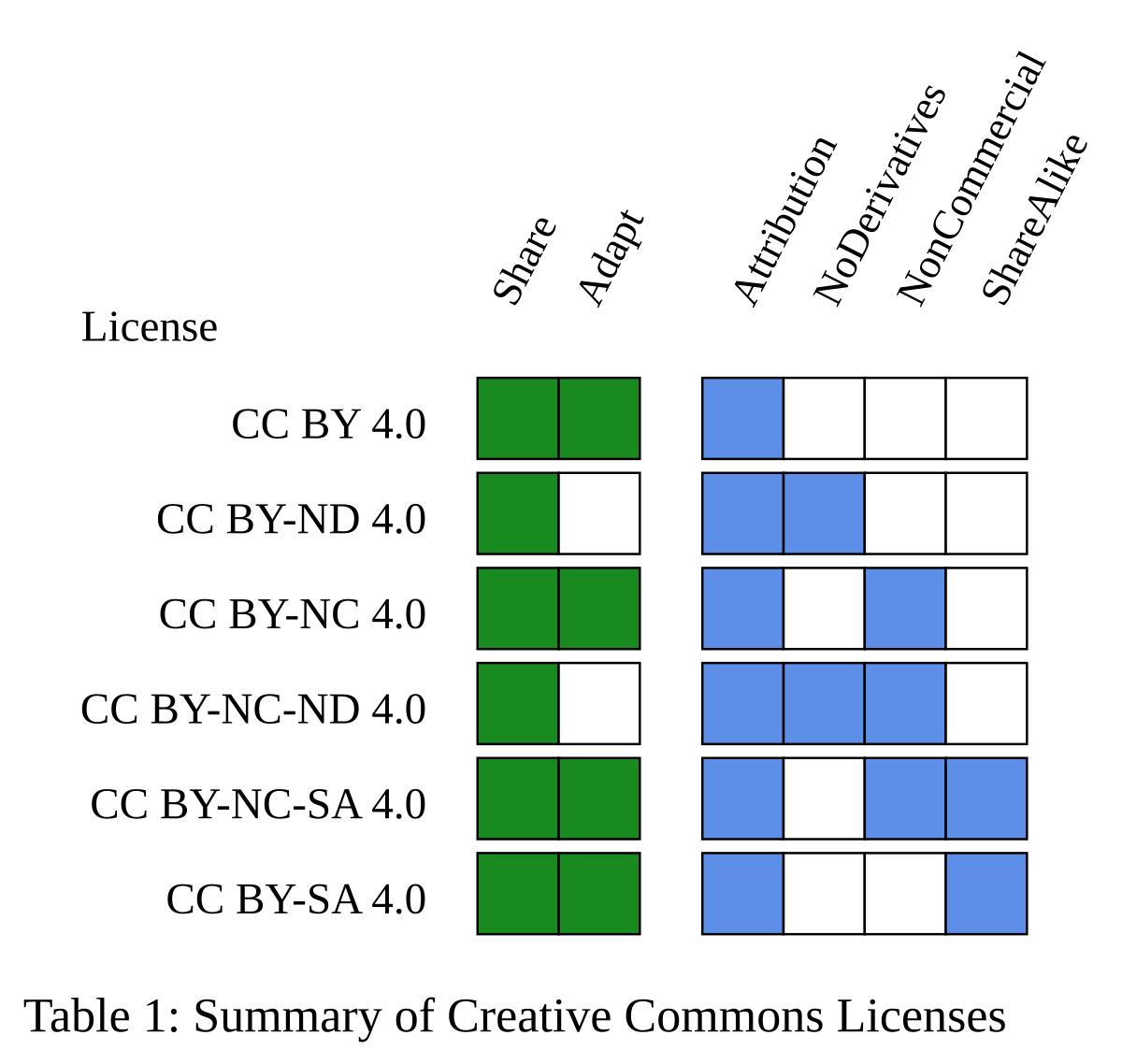
For details on which terms apply to each Creative Commons license, refer to the table Summary of Creative Commons Licenses.
You are free to (green):
- Share - copy and redistribute the material in any medium or format
- Adapt - remix, transform, and build upon the material.
The licensor cannot revoke these freedoms as long as you follow the license terms.
Under the following terms (blue):
- Attribution - You must give appropriate credit, provide a link to the license, and indicate if changes were made. You may do so in any reasonable manner, but not in any way that suggests the licensor endorses you or your use.
- NoDerivatives - If you remix, transform, or build upon the material, you may not distribute the modified material.
- NonCommercial - You may not use the material for commercial purposes.
- ShareAlike - If you remix, transform, or build upon the material, you must distribute your contributions under the same license as the original.
Summary of Creative Commons Licenses
No additional restrictions: You may not apply legal terms or technological measures that legally restrict others from doing anything the license permits.
Notices:
You do not have to comply with the license for elements of the material in the public domain or where your use is permitted by an applicable exception or limitation.
No warranties are given.
The license may not give you all of the permissions necessary for your intended use.
For example, other rights such as publicity, privacy, or moral rights may limit how you use the material.
4.2 Hierarchy Structure Description
We will advise you on how to best structure your data for archiving in DOKU.
Data in DOKU are organized in multiple elements with a hierarchical structure.
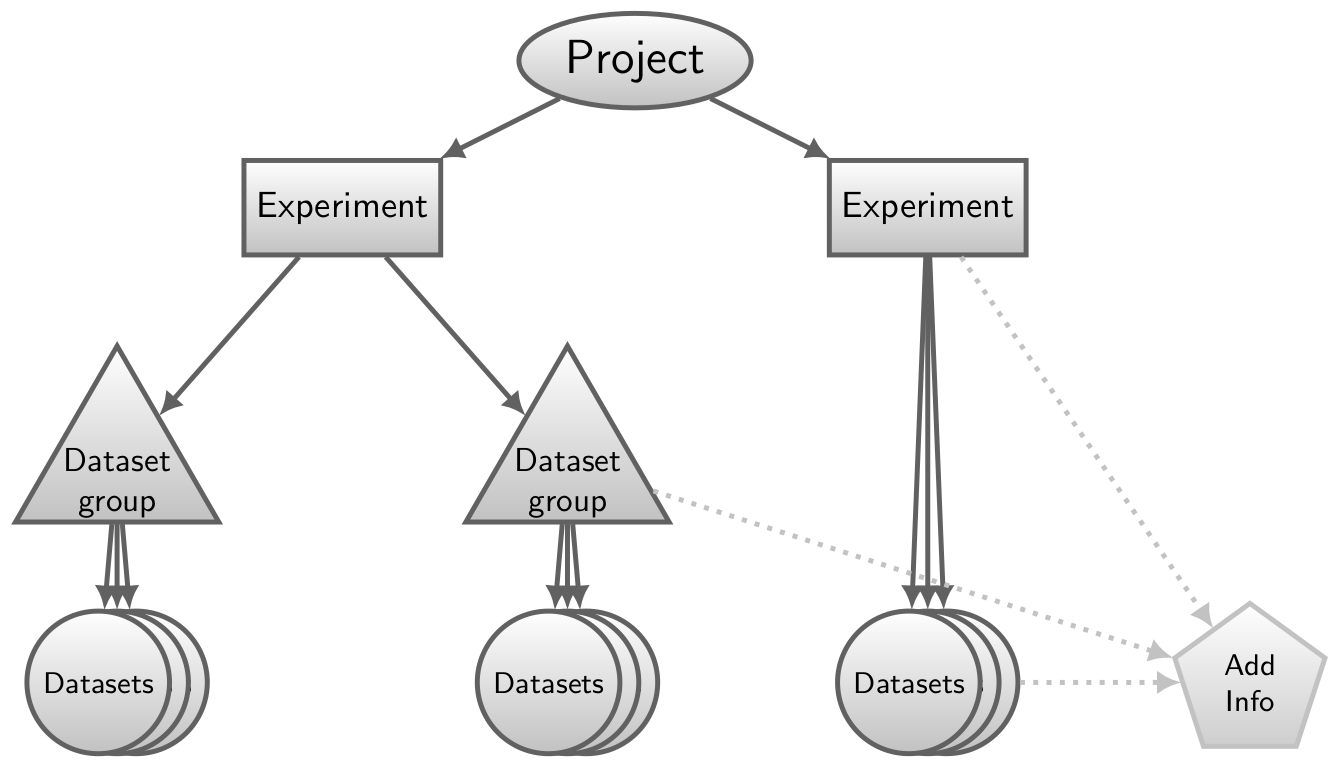
These hierarchical elements are named: Projects, Experiments, Dataset Groups, and Datasets.
The relationships between them can be described with a tree structure as shown in the figure DOKU hierarchical structure elements.
For the top-level elements only single-parent (mono-hierarchical) relationships are supported.
That means that only one parent is allowed for each Experiment and Dataset Group, but a parent can have multiple child elements.
Datasets and Additional Info entries (which are a bit of an exception and will be described later in this guide) need to have at least one parent.
Projects, Experiments, and Dataset Groups contain the overall description of the data, i.e. the metadata.
Metadata is the description of the data itself.
Detailed metadata is essential for later reuse of the data and therefore for long-term archiving.
These elements (Project, Experiment, and Dataset Groups) can therefore be used to structure the data.
The data themselves are located in the Datasets (which also contain a description of the data).
Each DOKU-Dataset is part of a hierarchical tree with an Experiment and a Project, while DOKU-Dataset Groups are optional elements that are only used for more complex structures.
A minimalistic structure needs to contain at least one Project, one Experiment, and one DOKU-Dataset.
DOKU hierarchical structure elements
Project:
A Project is the top-level hierarchical element.
All data that are archived under DOKU belong to the same Project: "Long-term Archiving of Climate Model Data at WDC Climate and DKRZ (DOKU)".
Experiment:
An Experiment is a child of a Project and a compilation of Dataset Groups or Datasets.
In DOKU, each DKRZ project (e.g. bm0000) becomes an Experiment containing all DOKU-Datasets archived under that project account.
Note that "Experiment" is just a name for a hierarchical element and should not be confused with a model run, for example.
(DOKU-)Dataset Group:
A Dataset Group is a compilation of Datasets or Dataset Groups.
This optional element is not needed for smaller projects, but can be helpful for larger or more complex structures to organize data at a finer granularity.
A Dataset Group is a child of an Experiment or another Dataset Group.
In DOKU, Datasets are usually direct children of Experiments without the need for DOKU-Dataset Groups.
However, for larger projects or in some special cases it can be useful to group several DOKU-Datasets in a DOKU-Dataset Group.
(DOKU-)Dataset:
A Dataset consists of one or more data files and their description (the metadata) needed to make the data understandable.
A DOKU-Dataset is a child of an Experiment or a DOKU-Dataset Group.
Additional Info:
An Additional Info is an optional element that is located at the same hierarchical level as a Dataset, i.e. it is a child of an Experiment, Dataset Group, or Dataset and can have more than one parent.
It is defined as a compilation of documents (or sometimes plots, scripts, etc.) that further enhance understanding of the data.
4.3 Nomenclature
In the hierarchical structure described above, each element needs a name that serves as the title for this entry and will also be used in the search interface.
In general, the structure and nomenclature are your choice, but we will advise you and ask you to follow the guidelines listed below.
The entry name serves as a unique identifier for the metadata and has a maximum length of 200 characters. Follow these guidelines for naming:
- The first letter of each word should be capitalized.
- Use spaces between words instead of underscores, unless absolutely necessary.
- The name should clearly describe the content of the entry and be easy to understand, providing a clear idea of what the data represents, even to those who may not be experts in the field.
- DOKU-Dataset names should make sense on their own, without needing additional context such as the DOKU-Dataset Group.
- Avoid using a mix of letters, numbers, and excessive changes in case (upper/lower), as this can make the entry harder to find.
- If a version number is needed, use this format: "Title of the Entry (Version 2.1)".
5 Data Preparation
Prepare your data files for submission.
The following sections explain what to take into consideration.
Most importantly, you need to structure and document your data in a way that ensures reusability even years later.
5.1 Data Format
Only open data formats are accepted in DOKU.
The preferred file format for archiving is NetCDF (Network Common Data Form).
More information on NetCDF can be found here.
Other supported data formats are, for example, GRIB (GRIdded Binary), CSV, and ASCII.
However, in many cases it might be sensible to bundle your files into tar archives.
5.2 File Size
The preferred file size is 10 GB to 100 GB.
There is no lower limit, but small files are not optimal for tape storage. Each file smaller than 1 GB still counts as 1 GB toward your quota usage.
It also takes longer to archive many small files than a few larger files.
Therefore, it is recommended to pack small files into tar archives.
Files larger than 100 GB can be archived, but we recommend a maximum file size of 200 GB.
If you have files larger than 200 GB, note that your DOKU request might take much longer to process.
5.3 Directory and Dataset Structure
While preparing your data, keep the following limits in mind:
- The maximum number of files per DOKU-Dataset is 500 (but fewer files are preferred).
- The total size of all files per DOKU-Dataset should not exceed 5 TB (but smaller total sizes are preferred).
If you have questions about these limits, contact us.
Your data may be archived directly from Levante disk (/work) or from the tape archive (/hsm/arch).
If your data are not already archived on tape, we recommend archiving from Levante disk.
For each DOKU-Dataset, create a subdirectory in your project space on Levante or in the tape archive (see Data located directly on Levante and Data located in the tape archive (/hsm/arch) for details).
These subdirectories should contain all files to be archived, but nothing else (everything in these subdirectories will be archived!).
The directory structure below your DKRZ project directory will be preserved in /hsm/doku. For example:
/hsm/arch/bm0000/path/to/your/data/<name_of_first_dataset>/ will become/hsm/doku/bm0000/DKRZ_LTA_0000_ds00001/path/to/your/data/<name_of_first_dataset>/.5.3.1 Data located directly on Levante
If your data are located on Levante, make sure they are in the correct DKRZ project directory.
The paths will look like this:
/work/bm0000/x123456/path/to/your/data/<name_of_first_dataset>/,/work/bm0000/x123456/path/to/your/data/<name_of_second_dataset>/, ...During your archival request, the files must not be touched until your data are completely archived. If necessary, contact us first. The files also need to be globally readable.
Once your data are completely archived, you may change permissions again or even delete them from Levante.
5.3.2 Data located in the tape archive (/hsm/arch)
If your data are already archived in /hsm/arch, you do not need to transfer them to Levante.
We can archive them in /hsm/doku directly from /hsm/arch.
However, the data still need to be organized according to the DOKU-Dataset structure and located under the correct DKRZ project directory in /hsm/arch.
The paths will look like this:
/hsm/arch/bm0000/x123456/path/to/your/data/<name_of_first_dataset>/,/hsm/arch/bm0000/x123456/path/to/your/data/<name_of_second_dataset>/, ...Once you have provided us with the location of the data, the files must not be touched. If necessary, contact us first. After the data are completely archived, the files will only be located in /hsm/doku and will be removed from /hsm/arch.
Further documentation on how to use the tape archive can be found here.
5.4 Labeling of Files and Directories
Files should be labeled in a consistent manner.
Special characters and spaces in directory and file names are not allowed.
The file names must be unique.
Use descriptive file names so that others can understand what each file contains.
Once your data are in the correct subdirectories in /work or /hsm/arch, send us the following information:
- the data path for each DOKU-Dataset
- the number of files for each DOKU-Dataset
- the approximate size for each DOKU-Dataset
With this information, we can start data filling.
6 Submission of Metadata - MetaXA Guide
The metadata belonging to your data should be entered via the graphical user interface (GUI), MetaXA.
If you do not have an account already, apply for an account.
Alternatively, DKRZ users can also log in with their DKRZ credentials (DKRZ username and password).
Press "Switch to DKRZ login" if you want to do this.
In MetaXA, you can enter metadata for DOKU-Datasets.
You can also add or edit a Person, DOKU-Dataset Group, Additional Info, or Citation/Reference.
These elements are explained below in the order in which they appear in MetaXA.
Only marked fields are required, but try to fill out as many details as possible.
Help texts are available directly in MetaXA (via the little
?), and each field is described below.6.1 Person
Start with the person entry.
First make sure that all persons relevant to your data are listed in our database.
Relevant persons are all authors and at least one contact. Contacts are people familiar with the data and should remain reachable in the long term, for example through a long-term contract.
Use the search form to check whether the person in question is already listed in our database.
Do so to avoid duplicate entries.
If you find the person, check whether all information is still correct.
Make corrections, if necessary.
If you cannot find the person, click "Add new person".
Enter the person's details here.
New Person
| Field | Required | Comment |
|---|---|---|
| Last Name | ✓ | The last name as it should be listed with the publication. The name cannot be changed later. |
| First Name | ✓ | The first names as they should be listed with the publication. The name cannot be changed later. |
| Title | Select from the list if applicable. | |
| Institute | ✓ | Select an institute from the list (according to the current affiliation of the person). The dropdown list includes all institutes already in our database in the format "Institute, Department". If you do not find the correct institute/department, click "Other (new) Institute". |
| ✓ | The primary institutional email address. | |
| External Identifier Type Id | Choose ORCID here. You can also add the ID for ResearchGate or ResearcherID. If you do not have an ORCID, you can get it here. | |
| External Id | Valid ORCIDs have the following form: 0000-0000-0000-0000. | |
| Other (new) Institute: | ||
| Institute Name | ✓ | Name of the institute, preferably in English. |
| Institute Acronym | Acronym of the institute, if available. | |
| Department Name | Name of the department, preferably in English. | |
| Department Acronym | Acronym of the department, if available. | |
| Country | ✓ | Select from the list. |
| Url | Webpage of the institute. | |
| External Identifier Type Id | Select the type of external identifier for the institute: ISNI, ROR, or CrossRef Funder ID. You can add more than one. | |
| External Id | Enter the ID here in the correct format. |
6.2 DOKU-Dataset Group
DOKU-Dataset Groups may be used to group DOKU-Datasets that belong together.
In many cases, they are not necessary and can be omitted.
If you would like to use this option, contact us first.
The following elements are important for DOKU-Dataset Groups.
The following tables will help you to enter metadata into MetaXA.
Go to "Finalize Entries" once you are finished.
Changes can still be made later, but you can no longer make them yourself. Contact us if amendments are needed.
Metadata Entry
| Field | Required | Comment |
|---|---|---|
| DKRZ Project Number | ✓ | The internal DKRZ project number, e.g. "bm0000". |
| Name | ✓ | The entry name uniquely identifies the metadata entry (DOKU-Dataset Group). The maximum length is 200 characters. The name should meet the following criteria: - The first letter of each word should be capitalized. - Use spaces between words instead of underscores, unless absolutely necessary. - The name should clearly describe the content of the entry and be easy to understand, providing a clear idea of what the data represents, even to those who may not be experts in the field. - Avoid using a mix of letters, numbers, and excessive changes in case (upper/lower), as this can make the entry harder to find. - If a version number is needed, use this format: "Title of the Entry (Version 2.1)". |
| Summary | ✓ | Describe what is covered by the DOKU-Dataset Group. Include information on the entry that has not been entered into any other fields. The summary may contain links to further information. The maximum length is 4000 characters. |
| Data has no temporal/spatial information | Select these boxes (or one of them) if the data has no temporal and/or no spatial information. |
Citation Information
| Field | Required | Comment |
|---|---|---|
| Citation Title | The title of the citation. Follow the naming guidelines described in Nomenclature. By default, leave this field empty so that the entry name is used as the citation title. Only enter a different citation title if there is a specific reason. | |
| Authors List | ✓ | The authors of the data as they should appear in the citation. Sort the authors accordingly. |
Temporal Coverage
This block is only available if the box "Data has no temporal information" has not been selected.
| Field | Required | Comment |
|---|---|---|
| Start Year | ✓ | The first year of the considered time period. |
| Month | ✓ | The first month of the considered time period. |
| Day | ✓ | The first day of the considered time period. |
| Stop Year | ✓ | The last year of the considered time period. |
| Month | ✓ | The last month of the considered time period. |
| Day | ✓ | The last day of the considered time period. |
| Currentness Reference | The currentness reference reflects the construction of the time axis. Choose the correct calendar from the list. Use "not filled" if no entry matches. |
Spatial Coverage
This block is only available if the box "Data has no spatial information" has not been selected.
| Field | Required | Comment |
|---|---|---|
| Min Lon | ✓ | The minimum longitude of the considered domain [-360.0, 360.0]. |
| Max Lon | ✓ | The maximum longitude of the considered domain [-360.0, 360.0]. |
| Min Lat | ✓ | The minimum latitude of the considered domain [-90.0, 90.0]. |
| Max Lat | ✓ | The maximum latitude of the considered domain [-90.0, 90.0]. |
| Min Altitude | Minimum altitude. Example for ocean/atmosphere data: -6200 m (ocean) to 10 hPa (atmosphere). | |
| Min Alt Unit | Unit for minimum altitude. | |
| Max Altitude | Maximum altitude. Example for ocean/atmosphere data: -6200 m (ocean) to 10 hPa (atmosphere). | |
| Max Alt Unit | Unit for maximum altitude. |
6.3 DOKU-Dataset
There are different methods to enter metadata for DOKU-Datasets.
Normally, you will use MetaXA.
If you have a large number of DOKU-Datasets, discuss with us whether MetaXA or CSV lists would be better for your case.
6.3.1 MetaXA
The following tables will help you to enter metadata into MetaXA.
Go to "Finalize Entries" once you are finished.
Changes can still be made later, but you can no longer make them yourself. Contact us if amendments are needed.
Metadata Entry
| Field | Required | Comment |
|---|---|---|
| DKRZ Project Number | ✓ | The internal DKRZ project number, e.g. "bm0000". |
| Parent | If a DOKU-Dataset Group is a parent element for this DOKU-Dataset, select it from the list. | |
| Name | ✓ | The entry name uniquely identifies the metadata entry (DOKU-Dataset). The maximum length is 200 characters. The name should meet the following criteria: - The first letter of each word should be capitalized. - Use spaces between words instead of underscores, unless absolutely necessary. - The name should clearly describe the content of the entry and be easy to understand, providing a clear idea of what the data represents, even to those who may not be experts in the field. - DOKU-Dataset names should also make sense on their own, without needing additional context such as the DOKU-Dataset Group. - Avoid using a mix of letters, numbers, and excessive changes in case (upper/lower), as this can make the entry harder to find. - If a version number is needed, use this format: "Title of the Entry (Version 2.1)". |
| Summary has been provided with parent metadata | Select this box if the summary has already been provided with the parent element (DOKU-Dataset Group). | |
| Summary | ✓ | Describe what is covered by the DOKU-Dataset. Include information on the entry that has not been entered into any other fields. The summary may contain links to further information. The maximum length is 4000 characters. |
| Responsible Person | ✓ | The person selected here is responsible for the metadata published for the DOKU entry. |
| Use Constraint (License) | "Use Constraint" reflects constraints regarding the use of the data. Refer to License for details. | |
| Format | ✓ | Select the data format from the list. For details, see Data Format. |
| Data has no temporal/spatial information | Select these boxes (or one of them) if the data has no temporal and/or no spatial information. |
Data Citation
| Field | Required | Comment |
|---|---|---|
| Authors have been provided with Dataset Group metadata | Select this box if you want to take the citation information from the parent DOKU-Dataset Group (if available). | |
| Citation Title | The title of the citation. Follow the naming guidelines described in Nomenclature. By default, leave this field empty so that the entry name is used as the citation title. Only enter a different citation title if there is a specific reason. | |
| Authors List | ✓ | The authors of the data as they should appear in the citation. Sort the authors accordingly. |
Temporal Coverage
This block is only available if the box "Data has no temporal information" has not been selected.
See 6.2 Temporal Coverage for details.
Spatial Coverage
This block is only available if the box "Data has no spatial information" has not been selected.
See 6.2 Spatial Coverage for details.
6.3.2 CSV Lists
If you have many DOKU-Datasets that are similar, it might be more convenient to create a CSV list containing all relevant metadata.
We will provide further instructions if this applies to your data.
6.4 Additional Info
Fewer fields are needed for Additional Info entries.
Go to "Finalize Entries" once you are finished.
Metadata Entry
| Field | Required | Comment |
|---|---|---|
| Name | ✓ | The entry name uniquely identifies the metadata entry (Additional Info). The maximum length is 200 characters. The name should meet the following criteria: - The first letter of each word should be capitalized. - Use spaces between words instead of underscores, unless absolutely necessary. - The name should clearly describe the content of the entry and be easy to understand, providing a clear idea of what the data represents, even to those who may not be experts in the field. - Avoid using a mix of letters, numbers, and excessive changes in case (upper/lower), as this can make the entry harder to find. - If a version number is needed, use this format: "Title of the Entry (Version 2.1)". |
| Summary | ✓ | Describe what is covered by the Additional Info. Include information on the entry that has not been entered into any other fields. The summary may contain links to further information. The maximum length is 4000 characters. |
| Parent | ✓ | Select a DOKU-Dataset Group or DOKU-Dataset to be the parent of this entry. If you have already entered the element, it should appear in this list. |
| Publication Type | Only if applicable, select the publication type that best describes the entry. | |
| Use Constraint (License) | "Use Constraint" reflects constraints regarding the use of the data. Refer to License for details. |
Citation Information
| Field | Required | Comment |
|---|---|---|
| Citation Title | The title of the citation. Follow the naming guidelines described in Nomenclature. By default, leave this field empty so that the entry name is used as the citation title. Only enter a different citation title if there is a specific reason. | |
| Authors | The authors of the data as they should appear in the citation. |
File upload
The Additional Info can consist of one or more files.
You can upload one or more files directly in MetaXA.
The preferred file format for Additional Info entries is PDF.
If you cannot upload your file, this is most likely due to an unsupported file format.
Convert it to PDF or contact us to discuss whether another file format is appropriate.
6.5 Citation / Reference
You can add references to your entries.
Use the upper left field to search for existing citations.
If you want to add new citations, use "Create New Reference" in the upper right corner.
This opens the form for entering metadata for a new Citation/Reference.
If a DOI is available, enter it in the respective field in the format
doi:10.1045/january2015-brase and click "Insert from CrossRef".
Otherwise, fill in the fields below (required fields are marked with a red asterisk).If you edit or add a reference in MetaXA, you can also connect it with your entry.
If you have already entered the DOKU-Dataset or DOKU-Dataset Group in MetaXA, you will find it in a list and can choose one or more of the entries.
Otherwise, contact us to connect the reference to your entries.
6.6 Finalize Entries
Once you have completed entering all relevant metadata for an entry, go to "Finalize Entries".
This notifies us that we can further process your entries and continue with your request.
This needs to be done for DOKU-Dataset Groups, DOKU-Datasets, and Additional Info entries.
Person and Citation entries can be added without "Finalize Entries".
Check all appropriate entries and click "Finalize Selected Entries".
After you have completed "Finalize Entries", we will continue with your request.
Changes can still be made later, but you can no longer make them yourself.
Contact us if amendments are needed.
7 Final Check
Once data filling is complete and the status of your data has been set to "completely archived", we will inform you and ask you to perform final checks.
Check the metadata one last time.
Also check if all your files are ready for download.
We also recommend downloading one or two sample files to check that everything works as expected.
8 How to cite your data
All DOKU-Datasets (and DOKU-Dataset Groups) are assigned a persistent URL once the metadata are online.
Even before the data filling process has been completed, the URL is final and can, for example, be used for publications.
When submitting a paper to a journal, it is often sufficient to provide a persistent URL linking to the metadata. The data must subsequently be made available.
8.1 PIDs for DOKU-Datasets
Once the data are available for download, the DOKU-Dataset Groups and DOKU-Datasets are assigned a handle PID (persistent identifier).
This is a unique code of digits and letters that makes your data better citable.
A handle PID is even more suitable for referencing your data in a journal publication than a persistent URL.